
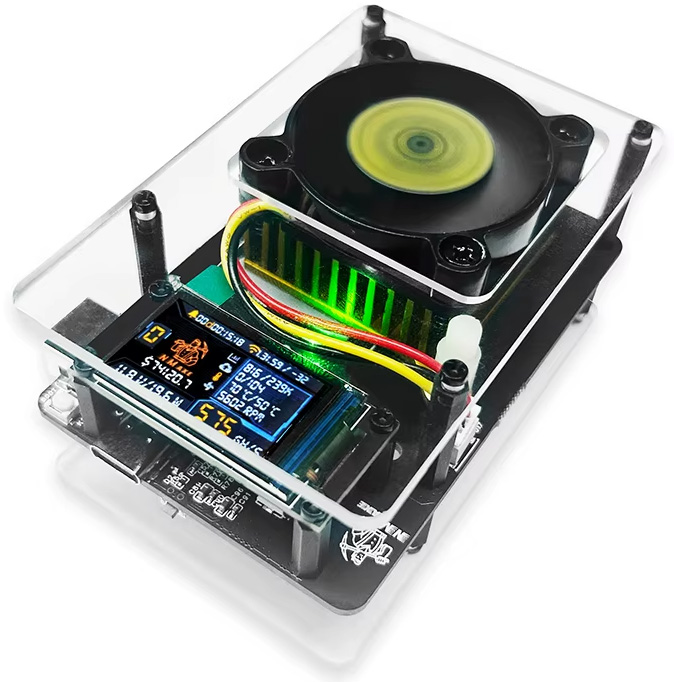
If you’re running a Bitaxe solo miner, regular maintenance isn’t optional. It directly impacts your hash rate, stability, and hardware lifespan.
You can start this project work because it does not need any costly equipment. The mining rig will function properly throughout its entire operational period.
What is Bitaxe Maintenance?
Bitaxe maintenance process involves keeping all equipment through cleaning, temperature control methods, and software updates to achieve maximum operational efficiency.
This includes:
- Cleaning dust
- Maintaining heatsinks
- Monitoring temperature
- Applying thermal paste
- Updating firmware
Why Maintenance is Important?
Ignoring maintenance can lead to:
- Overheating
- Reduced hash rate
- Hardware damage
- Shorter lifespan
Even minor dust accumulation, which is a minor problem, can also lead to a performance decline that occurs over an extended period.
6 Essential Bitaxe Maintenance Tips
Here are six elements of maintenance that will keep your Bitaxe solo miner running and performing smoothly for years to come. For tips on how to enhance performance by modifying your Bitaxe, check out Modding Your Bitaxe.
1. Dusting
One of the most frequent problems with mining Bitcoin hardware devices is dust accumulation. Users usually realize it once dust has a negative effect on hardware performance. Dust prevents proper air circulation around hardware, thereby decreasing the efficiency of fans and heatsinks and increasing the temperature in mining hardware. This can lead to hardware instability or failure.
Besides preventing proper ventilation, dust affects Bitcoin mining hardware negatively by creating the potential for electrical malfunction. In case dust covers some sensitive components, it may become the cause of short-circuiting and general instability of Bitcoin mining hardware devices. Also, it is worth mentioning that dust creates problems when users try to access components for troubleshooting.
As a result, it is vital to ensure that hardware is always cleaned. In such cases, compressed air can serve as an effective tool for cleaning hardware since there will be no risks of hardware damage. During cleaning, fans should be held still to prevent overspinning.
2. Heatsinks
Heatsinks are indispensable parts of the thermal management system employed by Bitcoin mining rigs. These components help the absorption of excess heat generated by advanced chips by increasing the total surface area. Traditionally made of aluminum or copper, these devices rely on good installation and placement, as well as effective ventilation provided by cooling fans to work properly.
Proper orientation and mounting ensure heatsinks work effectively. The devices have to be oriented in a manner that ensures both a tight connection with heat-producing components and sufficient air flow. Heatsinks will lose their effectiveness because of dirt accumulation, loose mounting, and thermal paste deterioration.
Heatsink maintenance involves two key tasks because the paste needs to be replaced, and bent or corroded fins need to be repaired. The device must remain securely fixed to its designated position while it needs to maintain proper airflow to stop overheating.
3. Temperature
Cryptocurrency mining equipment demands proper temperature monitoring. The essential requirement demands that you must acquire proper software that enables you to collect real-time data from essential components, including graphics processing units and ASICs. The current mining equipment provides users with built-in sensors and monitoring features that allow them to track equipment performance while receiving alerts for temperature levels that exceed safe operating limits.
The system needs both temperature monitoring and control, because both functions require equal measurement. The process requires you to adjust fan speeds while maintaining proper ventilation and airflow conditions and managing room temperature control. The installation of air conditioning systems operates as a basic solution, while liquid cooling systems provide access to advanced cooling methods.
The actual layout of mining hardware needs to be considered as another essential requirement. The Celsius temperature reduction process needs mining rig space, which is properly balanced with ventilation systems to achieve efficiency improvements. The system operation needs to function without any heat sources, which include cooking equipment, because the hot months require decreased system operation for optimal performance.
4. Selecting a Thermal Paste
If you want your Bitaxe miner to perform well, you might want to opt for something like Thermal Grizzly Kryonaut or Arctic MX-6 because these are examples of non-electrically conductive thermal pastes. Nevertheless, there are plenty of folks who have gotten excellent results using Noctua NT-H1 or any other kind of non-electrically conductive paste. It is crucial to understand that only non-electrically conductive paste should be used.
Top Recommendations
Thermal Grizzly Kryonaut: Recommended very often as one of the most optimal thermal pastes due to its high level of thermal conductivity and its usage in high-performance components such as Bitaxe mining.
Arctic MX-6: A popular and widely used thermal paste that is not conductive and is great for working at high temperatures.
Noctua NT-H1: Cheap and simple thermal paste, described by users as something that will work “just fine” with Bitaxe miners.
Arctic MX-4: Old but reliable non-conductive thermal paste.
What to Look For
Non-conductive: This is the most important characteristic of mining equipment. Any kind of electrically conductive paste – like liquid metal will create short circuiting, damaging your equipment.
High thermal conductivity: The material must be made up of high thermal conductivity materials, measured in W/mK, to ensure optimum heat transfer from the chip to the heat sink.
Use good-quality brands to minimize any danger of using inferior-quality products.
Thermal paste will be applied as well as applied, and we will give you some advice on how to apply it correctly to your Bitaxe lottery miner.
5. Applying a Thermal Paste
The correct method to use thermal paste requires first completing the necessary preparation tasks. The process requires complete powering down of the mining rig before any further steps can take place. The technician must use isopropyl alcohol and a lint-free cloth to remove existing thermal paste after the heat-producing components become available for inspection. The current thermal paste needs to be removed because it will obstruct proper heat dissipation through the system.
When the surface is entirely free from old thermal paste, the correct quantity of fresh thermal paste should be used. Excessive amounts may result in excess paste flowing over other hardware components, whereas insufficient amounts could leave portions of the chip without any thermal paste at all. Applying the appropriate amount of thermal paste usually involves placing a drop roughly the size of a pea in the middle of the chip.
It is vital to check the temperatures post-reassembly to verify whether the entire process has been completed successfully. Checking temperatures for the initial hours after reassembly is highly recommended in order to ensure stability and prevent any overheating issues. Thermal paste wears out with time due to frequent heating and cooling processes, and regular application is required in order to provide protection to hardware such as Bitaxe Solo Miner.
6. Firmware:
-
Performance and Efficiency:
Firmware updates can unlock new levels of efficiency and performance, potentially leading to higher hash rates and increased profitability.
-
Security:
Regularly updating firmware helps protect your mining operation from cyber threats and vulnerabilities, as updates often include security patches and bug fixes.
-
Longevity:
Updating firmware can prolong the operational lifespan of your mining rigs by addressing potential issues and optimizing overall performance.
-
Bug Fixes:
Firmware updates frequently address bugs and glitches that can impact the performance and stability of your mining hardware.
-
New Features:
Updates may also introduce new features and functionalities, enhancing the capabilities of your mining rigs.
-
Compatibility:
Firmware updates can ensure compatibility with the latest hardware and software technologies, preventing potential issues.
By combining these strategies with regular maintenance practices like dusting and thermal paste application, miners can create an environment conducive to sustained performance and longevity of their equipment. In the high-stakes world of cryptocurrency mining, where literally a fraction of a second can determine whether it’s you or your virtual neighbor that hits a block, maintaining optimal temperatures is essential for maximizing performance and profitability.
Key Takeaways
- Regular dusting helps prevent overheating and prolongs the lifespan of the Bitcoin miner.
-
Heatsinks play a vital role in dissipating heat and should be maintained for efficient care of your Bitaxe Solo Miner.
- Monitoring and controlling temperature is essential for maximizing Bitcoin miner performance and preventing damage.
- Applying thermal paste correctly is key to ensuring effective heat transfer and temperature regulation in Bitaxe Solo Miner.
- Updating the firmware of your Bitaxe Solo Miner is crucial for maintaining optimal performance.
Upgrading the quality of your HVAC filter can help reduce overall dust levels in your home, reducing the frequency of dusting your miners will need. You can take this a step further by purchasing a stand-alone air purifier to keep in the same room as your mining device(s).
All of these tips combine to create a proactive approach to maintenance that can save you time and money in the long run.
Ideal Temperature for Bitaxe Miner
Maintaining optimal temperatures while mining with your Bitaxe hardware is crucial for optimal operation and extended lifetimes. The optimum temperature at which the Bitaxe and all devices like it with their ASIC chips operate is between 60°C and 75°C. An occasional overheating can occur if the duration of overheating is not too long.
Common Mistakes to Avoid
A lot of problems related to mining can be solved by basic maintenance, which is easily avoidable.
- The first mistake is failing to clean dust from your equipment on time. Dust particles can impede the air movement and create a temperature build-up in the unit.
- Another mistake involves the application of excess thermal compound. The application of an excessive amount of thermal compound will impair the cooling process of the gadget.
- A third mistake involves failure to replace the heatsink correctly. This will affect heat dissipation and may lead to overheating of the gadget.
- A fourth mistake could be selecting the wrong thermal compound. If you select an electrically conductive compound, then your unit will be damaged.
- The final mistake includes failure to update the unit’s firmware.
FAQs
Does the placement of a Bitaxe miner affect its performance?
Yes. Proper placement is crucial. The miner, when placed in an enclosed or inadequately ventilated location, will heat up quickly, reducing its efficiency.
Is noise level something to worry about in Bitaxe miners?
Yes, unstable electricity may lead to crashes, while at other times, it may cause stress on the computer hardware.
How does humidity impact a Bitaxe miner?
Humidity may gradually degrade the performance of electronics due to potential corrosion or water accumulation. Maintaining a dry operating atmosphere improves the miner’s lifespan.
Can I run a Bitaxe miner continuously without breaks?
Yes, these devices are built for non-stop operation. However, it is necessary to monitor its work in order to prevent any problems from developing.
Conclusion
Performance and stability of the Bitaxe miner are related to the process of performing regular maintenance operations. You can avoid such issues as overheating and premature aging of equipment if you regularly clean it from dust, monitor its temperatures, take proper care of the heat sink, and use quality thermal paste during assembly. In this case, the miner will be stable and have the same performance rate.
However, firmware upgrades and an appropriate environment play no less significant a role. Updating firmware ensures efficiency, security, and modernity of the miner. At the same time, good ventilation and low humidity help increase the lifetime of hardware elements. Thus, some efforts are required to keep the Bitaxe miner operational for long periods of time.